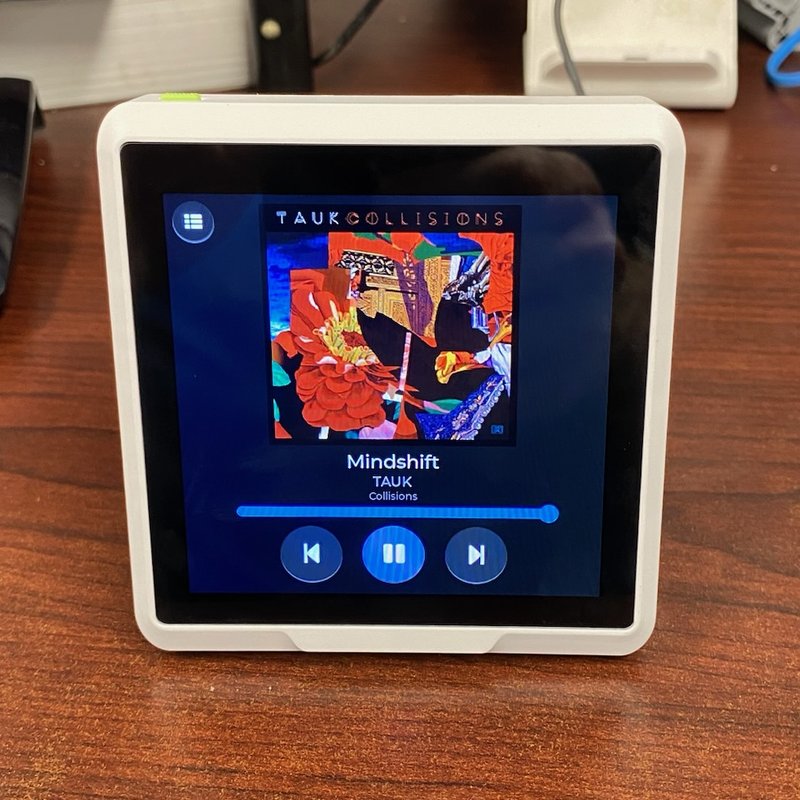
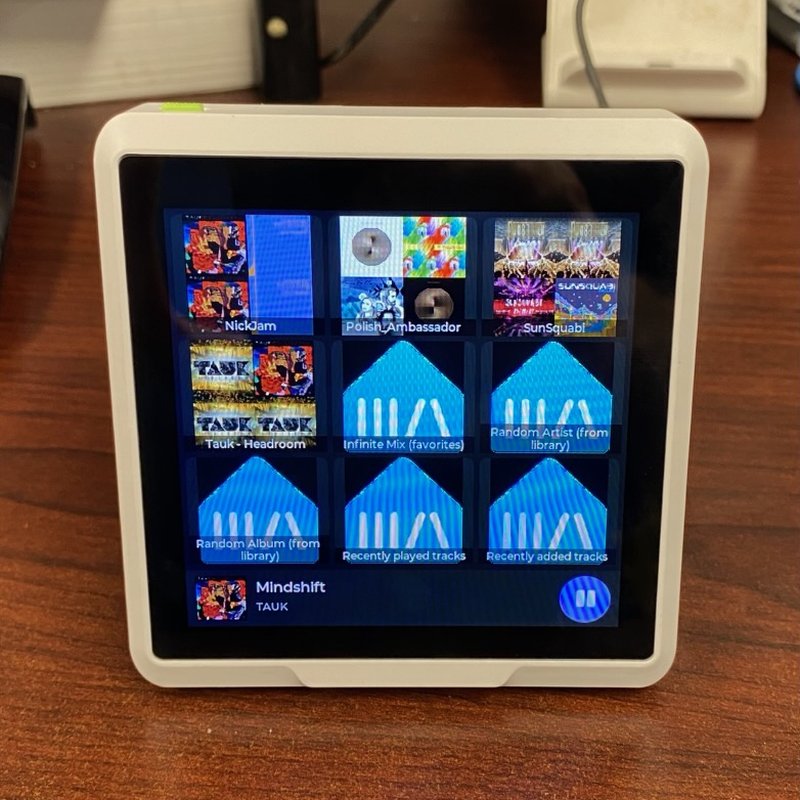
A 4-inch, 480 × 480 colour touchscreen on the office desk that works as a remote for Music Assistant. When nothing is playing it shows a 3×3 grid of playlists with their artwork, and a tap starts one. While music plays it switches to a Now Playing screen with album art, transport buttons and volume. The device is a Seeed SenseCAP Indicator D1 running ESPHome and LVGL. It was built with Claude Code over a week in August 2026.
The brief
The initial prompt:
similar to our home-assistant epaper work, i bought another device i’m hoping you can manage and deploy through esphome. https://www.seeedstudio.com/SenseCAP-Indicator-D1-p-5643.html ‘SenseCAP Indicator D1, 4-Inch Touch Screen IoT development platform powered by ESP32S3 & RP2040’ it’s currently plugged into the machine i’m on so i could potentially do the manual firmware update
Asked what the panel was for:
i want it to be for music assistant controls - at minimum a play/pause but ideally some buttons with nice images to select some preset playlists or artists
And where it would live:
it will live in my office and should control raspi-garage
That became the goal for v1:
- A 3×3 grid of playlist tiles with real artwork, each starting playback on tap.
- A Now Playing screen with transport controls and volume.
- The panel picks its own page, depending on whether anything is playing.
The player it controls, raspi-garage, is the Raspberry Pi that feeds the garage speakers.
The hardware
The Indicator D1 is an ESP32-S3 with 8 MB of PSRAM driving an ST7701S panel over a 16-bit parallel RGB bus, with a capacitive touch layer on I²C. A second chip, an RP2040, runs the buzzer, SD card and Grove ports. This panel uses none of those, so the RP2040 stays on Seeed’s factory firmware. It runs off USB-C and is always on.
ESPHome ships a board profile for the D1, so one line of config fills in all 16 RGB data pins, the sync timings and the mirroring. The profile doesn’t declare three things it needs: a PSRAM block, a driver for the I/O expander that holds the display’s chip-select pin, and an SPI bus for the panel’s init commands. Those three were the only validation errors in the whole build.
How it works
The panel holds no playlists of its own. Two template sensors in Home Assistant do the lookup:
- Presets asks Music Assistant for its library, finds the nine wanted items, and publishes a name, an artwork URL and a play URI for each.
- Art turns the current track’s artwork into URLs at the two sizes the screen draws.
The panel downloads the artwork from Music Assistant’s image proxy at runtime. Changing a tile is a Home Assistant config edit and a reload, never a re-flash.
The page follows playback: playing or paused shows Now Playing, anything else shows the grid. That automatic switch pauses for 20 seconds after any touch, so it never pulls the page away while someone is browsing.
Build stages
Each card is one stage of the build, with the commit that recorded it.
1
Config and first compile
- The config was written before the device had ever run ESPHome: two LVGL pages, eleven image buffers and 32 sensors imported from Home Assistant.
- A local ESPHome build in Docker, pinned to the add-on’s version, caught a C++ error that
esphome confighad passed. A lambda returned a ternary of two string literals, and ESPHome calls.c_str()on the result. - Nine tiles was the choice. Twelve would have been thumb-sized, and six wasted the screen.
2
First flash over USB
- On the first try, the Home Assistant box saw no USB device at all, not even one without a driver. That pattern usually means a charge-only cable or not enough power, so the next step was a different cable or port.
- The panel was plugged into the Home Assistant box itself and flashed with esptool. The board has its own USB hub, so one cable shows up as three devices, and the ESP32-S3 is the CH340 serial port.
- The first build would never have joined Wi-Fi, because it had been compiled against placeholder secrets. It was rebuilt with the real ones before flashing.
- The serial console prints the ROM banner and then nothing. That looked like a crash, but it is how this board behaves: ESPHome sends its log to USB pins that are wired to the RP2040. The boot was verified over the network instead. The backlight reporting
onshowed the display stack was up. - The panel joined at its reserved address and was adopted into Home Assistant over the REST API.
3
Artwork, four root causes
After the first flash, no artwork showed. Each cause was hidden by the next one, and they were found by checking each layer in turn:
- The hero art asked for an unsupported size. The image proxy only serves 80, 160, 256, 512 or 1024 px. A request for 320 gets an empty HTTP 400.
- The tiles had downloaded but were never repainted. Nothing in ESPHome tells LVGL that an image’s pixels changed, so every image needs an explicit update when its download finishes.
- Eleven downloads at once crashed the panel. They now run one at a time from a script.
- Five tiles failed to decode. Music Assistant’s built-in smart playlists share one icon, served as PNG even when JPEG is requested. ESPHome allows one decoder per image, so everything now asks for PNG.
The panel then logged eleven downloads, zero decode errors and no crashes.
4
- Every button and the volume slider had been doing nothing. A newly adopted ESPHome device isn’t allowed to call Home Assistant services by default, and the only trace was a “rejected” line in the core log. Turning that option on fixed all of them.
- The mini-player strip’s contents sat low and to the right. The strip is an LVGL button, and a button’s theme padding offsets its children. Zeroing the padding fixed it.
- From here on, each flash went over the network in about six seconds.
5
Shuffle, and a tap goes to Now Playing
- Playlists start shuffled and albums don’t. The panel decides from the item’s URI, so a tile changed from a playlist to an album picks the right default without a re-flash.
- Shuffle has to be set before the queue loads. Music Assistant reads it while building the queue, so setting it afterwards plays track 1 first and shuffles only the rest.
- A tile tap now flips to Now Playing itself. The automatic switch could never have done it, because a tap is a touch and touches pause the switch for 20 seconds.
- A shuffle toggle joined the transport row. The matching slot on the right is kept free for a repeat toggle.
6
Discography tiles
- A tile can now hold an artist’s albums in a hand-written order. They play in sequence, each in track order, and the tile shows the first album’s cover.
- Music Assistant doesn’t expose release years through Home Assistant, so the order comes from the year in each album’s folder name on the NAS.
Why three ways to change page
Swiping between pages on ESPHome can still fire the button where the swipe starts or ends. On a page made of nothing but buttons, a sloppy swipe could start a playlist. So the panel has three ways to change page: swipe, tap the mini-player strip or the back button, or press the hardware button on top. Swipe is the convenient way, but never the only one.
Timeline
| When | What happened |
|---|---|
| Bring-up | |
| 08-22 | Hardware constraints worked out from the ESPHome board profile, the Music Assistant API and the firewall rules. Build started. |
| 08-22 | Home Assistant template sensors added. All nine presets resolved with artwork. |
| 08-22 22:02 | Panel config written and compiled locally. Stage 1. |
| 08-22 23:28 | First flash over USB, rebuilt with the real secrets. On the network and adopted into Home Assistant. Stage 2. |
| 08-22 23:34 | Address pinned with a DHCP reservation. |
| Making it work | |
| 08-23 00:45 | Four artwork root causes found and fixed. Stage 3. |
| 08-23 | Service calls allowed, mini-player strip re-laid out, OTA over the network. Artwork confirmed on the panel. Stage 4. |
| 08-28 14:00 | Shuffle defaults, shuffle toggle, tap goes to Now Playing. Stage 5. |
| 08-29 | Deprecated image config migrated, verified with a throwaway debug build. |
| 08-29 21:21 | Tile taps, page flip and swipe checked on the panel. v1 shipped. |
| Since | |
| 10-07 | Discography tiles. Stage 6. |